Whyteleaf project
Let the Fun begin, up first is a 525 kg 6.6 meter UC with under weld plate.
More pictures can be seen @ whyteleaf project
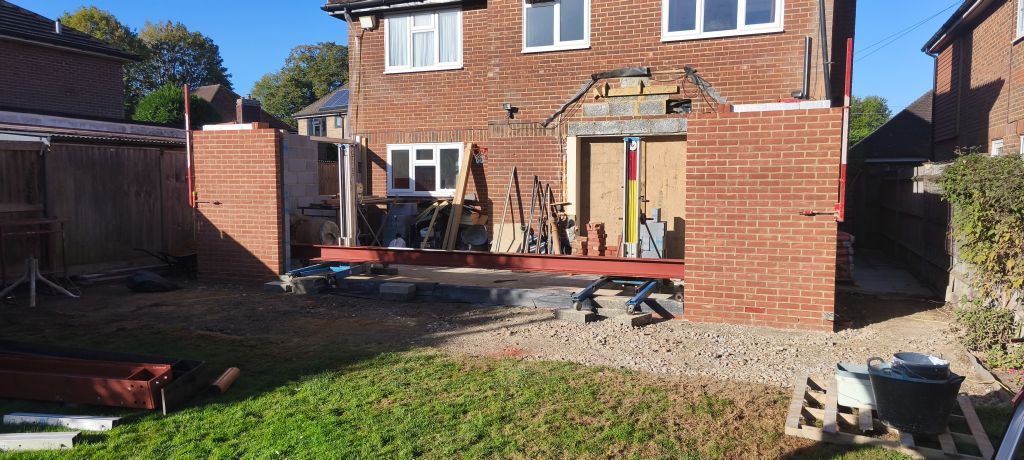
Let the Fun begin, up first is a 525 kg 6.6 meter UC with under weld plate.
More pictures can be seen @ whyteleaf project
Smart-UPS_Firmware_Upgrade_Wizard_v4.3.8v8
Version:
========
FUW 4.3.8
Applicable Models:
================
APC Smart-UPS SMT, SMX, SMC, SMTL, SRT, SCL, SRTL, SRTXU, XU, XP, CSH ,SRTL series.
OS Compatibility:(64-bit Only)
==============================
Release Notes (FUW 4.3.8):
==========================
1. USB upgrade issue fixed for UPS with the exception of Smart UPS with ID 1013 and 1014.
2. New firmware file updated for SRTL3KRM1UNC/SRTL2K2RM1UNC, SRTL3KRM1UC/SRTL2K2RM1UC, SRTL1062, SRTL1063, SRT1002,SRT1013,SRT1014,SRT1020,SRT1021,SRT1044,SRT1045, SMTL1064,SMC1028,SMT1027,SMC1018,SMT1015.
The Smart-UPS and single-phase Symmetra application firmware v7.2.0 release notes apply to the following NMC cards:
• AP9630 (CH) UPS Network Management Card 2
• AP9631 (CH) UPS Network Management Card 2
• AP9635 (CH) UPS Network Management Card 2
• Single-Phase UPS models with an integrated Network Management Card 2 – AP9537SUM
(e.g. All Smart-UPS SRT models 5kVA and above)
ap7921 firmware version AOS v394 / RPDU v393
Unzip and run the exe which will self extract and run the updater, follow prompts to login into pdu/ups.
I did have problems with login so I edited the iplist.txt and then rerun the updater upgrd_util file which then worked fine, may of just been a glitch.
Spent alot of time tracking down this version on the internet so hope this helps others
Sorting through previous projects and uploading pictures to gallery, check them out here
Welcome to the new RGB Services website, please check back soon as we add more content.